Article
Oct 22, 2025
Context Engineering for AI Agents
Discover how context engineering powers intelligent AI agents
Why Context Engineering Matters
"Prompting gets an answer. Context Engineering gets understanding."
The success of modern AI agents doesn't come from just powerful models — it comes from how intelligently we feed them information.
In today's world Large Language Models (LLMs) like GPT-4 or Claude are incredibly capable, but they're also stateless. Each time you prompt them, they begin with a blank slate — no memory. no awreness of past conversations, no understanding of your organizational data unless you provide it.
This reality makes context the single most valuable ingredient for your AI agent. While prompts define what the model should do, context engineering defines what the model knows at runtime.
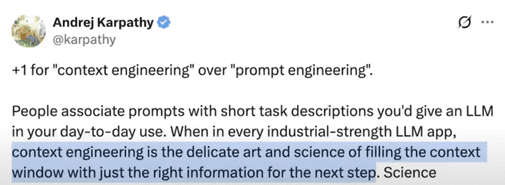
The growing challenge of agent systems
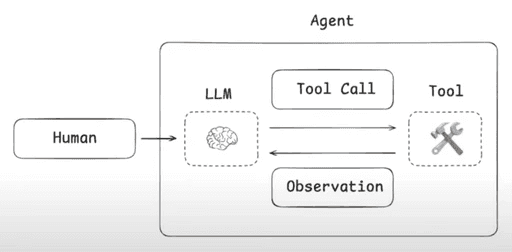
As we build agentic systems—where an LLM is bound with a set of tools and can autonomously loop through them—context growth becomes a critical challenge. Each tool call returns an observation. That observation is appended to the chat or messages list. Over time, the accumulation of observations, prompts, tool results, and interaction history becomes large and unbounded.
Anthropic: In their engineering blog post “Effective context engineering for AI agents”, they state that context is a “critical but finite resource” for agents running over multiple turns and longer workflows.
Manus AI (Manus): In their post “Context Engineering for AI Agents: Lessons from Building Manus”, the authors highlight how tool-call observations accumulate in the context and that the average input-to-output token ratio is ~100 : 1 in their system.
A typical task in Manus requires around 50 tool calls
Chroma Research: Their study “Context Rot: How increasing input tokens impacts LLM performance” shows that LLMs do not use long contexts uniformly and that performance degrades as input length grows—even for supposedly long-context models.
Thus, the core problem emerges: how do we avoid “context explosion” while still providing the right information for the agent to reason, act, and collaborate?
In short: only the right and relevant information must live in the agent’s working context so the next decision is correct, timely, and efficient.
Why this matters for business and technical stakeholders
For business decision-makers, context engineering directly impacts accuracy, cost and time-to-value. An agent with a bloated or disorganised context will make more errors, consume more tokens (hence cost more), and require more oversight.
For technical/ engineering teams, it means architecting not just the model or tools, but the entire “cognitive pipeline” — what context is loaded, when it’s pruned or summarised, how state is managed, which tool-calls are exposed, and how sub-agents collaborate.
In short: building robust agents isn’t about throwing more data or more tools at the model—it’s about feeding the right context at each moment.
Common Themes in Context Engineering
Here are the key themes emerging from current agent engineering practice, along with real-world examples and why they matter.
Write/ Offload Context
When an agent accumulates many tool calls, long conversations or large datasets, placing all of that into the LLM’s context window becomes impractical. Instead: store older or bulky information externally (in files, vector stores, databases) and load only what is necessary.
Use the file system for planning.
Use the file system for long-term memories.
Use the file system to offload token-heavy context.
Manus and Claude code uses file systems for offloading the context extensively.
Practical strategy: Use vector store or file storage; store heavy data, retrieve when needed; LLM sees only a pointer or a short summary.
Select/ Filter Context
Not every piece of past interaction or tool output is equally relevant for the “next step” of reasoning. Hence: select and filter only the most relevant pieces of context.
The LangChain article lists “select context” as a primary technique: embeddings, retrieval, and metadata filtering.
Practical strategy: Use embeddings + metadata + recency to rank past items, keep only top-K most relevant (for instance top 5 summaries, or items from last 90 days).
Compress / Reduce Context
Even after filtering, you may still have many history entries. Summarisation helps shrink them into compact forms while retaining meaning. You may want to
Summarize tool call outputs
Prune old tool calls/ messages.
Summarize/ compact agent message history.
Summarize/ prune at agent-agent handoff
Claude code leverages compaction features, once you hit a certain percentage of overall context window.
Cognition also uses the idea of summarizing or pruning at agent-agent handoffs.
Practical strategy: Periodically summarise chat logs, tool calls, or external observations into a “past state summary” block, and replace raw logs with that summary in the context window.
Isolate / Modularize Context
In multi-agent systems, each agent has a unique role and thus needs a tailored slice of context, not the entire shared pile.
LangChain describes splitting context by agent role in multi‐agent workflows.
Sub agents have their own context window
Claude subagents (mulri agent researcher) and Claude code utilize isolated context.
Temporal & Attention-Aware Engineering
It’s not only what information the agent holds, but when and how it is surfaced. Older context may be irrelevant; attention weight matters.
The article on context engineering emphasises that longer contexts can degrade performance due to “context rot” (distraction, confusion) as described by Anthropic.
Practical strategy: Tag context items with timestamps (e.g., “Q3 2024 meeting notes”), sort them so recent & high-priority are surfaced first; reorder prompts so that high-priority instructions appear at the end of the context window for better attention.
Dynamic Context Windows
Context window size and content should vary depending on the phase: planning vs execution vs review.
Practical strategy: During planning, include broader context (goals, constraints, memories); during execution, only include the narrow “task at hand” context to minimise token usage.Memory State vs Message State
Architecturally distinguish between “data” state (persistent external memory) and “messages” state (what enters the prompt/state of the LLM).
Practical strategy: Store bulk data off to memory stores; only pass into prompt what’s required. This distinction helps scalability and modularity.
Theme | What it means in practice | Why it matters for agent performance |
|---|---|---|
Write/ Offload | Move bulky or older data out of context window, reference externally | Keeps window lean, reduces cost & latency |
Select/ Filter | Choose only the most relevant pieces of context to include | Prevents distraction or dilution of signal in the model |
Compress / Summarize | Summarise past logs/observations into compact form | Maintains memory without bloat, preserves meaning |
Isolate / Modularize | Tailor context per-agent role; limit cross-agent spill-over | Improves clarity, modularity, maintainability |
Temporal & Attention-Aware | Use timestamps, ordering and prioritisation of context items | Ensures freshness, relevance, and better attention focus |
Dynamic Context Windows | Vary context size and content based on task phase | Optimises performance for planning vs execution modes |
Memory State vs Message State | Separate external memory storage from prompt state | Improves architecture, token efficiency, and scalability |
Real World Application & Case Study
Case Study: Consulting Domain – Multi-Agent Workflow
Scenario: A consulting firm prepares for a key client meeting, aiming to propose a targeted plan for the next call. The system uses a multi-agent architecture built on LangChain + LangGraph.
Workflow Outline
Understanding client priorities & background
The Metadata Agent gathers information from CRM: client profile (industry, size, geography), past challenges, strategic priorities stored in internal systems.
Tools: Client Info Tool, Client Priorities Tool, and a Python Execute Tool to filter data (e.g., “select clients in Financial Services, revenue > $500M, priority ‘cloud migration’”).
Example: The agent retrieves that Client X is a banking-tier client, has priority “reduce tech debt” and “accelerate digital channel adoption”.
Understanding digital footprint & engagement patterns
The Digital Footprint Agent reviews: website analytics (via Document Readership Tool), webinar participation (Webinar Engagement Tool), inquiry logs (Inquiries Engagement Tool).
It uses Python Execute tool to parse those logs (filter by last 6 months, engagement > threshold) and extract e.g. “Client X attended 3 webinars on AI-driven banking, downloaded white-paper ‘cloud adoption in banks’.”
This identifies “digital channel interest” and “AI use case” engagement patterns.
Understanding past interactions
The Interactions Agent examines the email archive (Past Email Tool) and call transcript logs (Call Transcript Tool).
It extracts key insights: “During the last call, client emphasised ‘improving customer onboarding time’ and ‘data governance’.”
This agent isolates actionable phrases (e.g., “onboarding time”, “governance”).
Search & Insight Generation
The Search Agent performs internal/external web search: e.g., “trends in banking onboarding time reduction 2025”, “cloud migration benefits for Tier-1 banks”.
It retrieves articles, benchmarks, recent case studies (e.g., 2025 study showing banks reduced onboarding by 40% using cloud-native automation).
It filters, summarises and provides structured data.
Planner/Executor Workflow
A Planner (Master) Agent uses the LangGraph architecture. It uses the Write To-Do Tool to manage tasks and delegate sub-tasks to the above sub-agents.
Example: The Planner sees: Task “Prepare next-call proposal for Client X”. It breaks it into sub-tasks:
Metadata Agent → gather client background & priorities
Digital Footprint Agent → analyse web engagement
Interactions Agent → extract latest call and email insights
Search Agent → gather external benchmarks
Executor Agent → draft the agenda and proposal plan
The Planner publishes these tasks via the write-to-do tool; each sub-agent executes and returns results.
The Executor Agent compiles: “Based on client priorities (tech debt + digital channels), matched with recorded interactions (onboarding time & governance) and engagement patterns (AI webinars), here is a proposed agenda for the next call:
(i) present benchmark trend: banks onboarding time → 30%,
(ii) propose pilot cloud governance blueprint,
(iii) Q&A – alignment with priority.”
Context Isolation & State Management
Each sub-agent works with its own context. The Metadata Agent’s messages state includes only background & priorities; Digital Footprint Agent’s context includes only engagement data; interaction data is isolated likewise. This avoids cross-pollution of context.
“Data” state variables: For the Metadata and Digital Footprint Agent, the Python Execute Tool writes filtered structured data into
datastate, rather than flooding the messages state. Only relevant summaries are passed to the LLM’s message state.Between agents, the Planner reads from their summaries and hands off tasks. The context remains modular, controlled and efficient.
Linking to Common Themes
Offload / Write: Raw engagement logs or call transcripts are stored externally; only summary view enters agent context.
Select / Filter: Each agent filters the data to relevant items (e.g., last 6 months, high engagement) before feeding the model.
Compress / Summarise: Past 12 months of email threads are digested into two bullet summaries.
Isolate / Modularise: Each agent holds separate context; the Planner doesn’t see verbatim email logs, only key points.
Temporal & Attention-Aware: The most recent interaction (last call 2 weeks ago) is surfaced at end of context for priority; older background is placed earlier in prompt.
Memory State vs Message State: Data variables hold large structured datasets; messages hold only compact summaries for LLM.
Dynamic Context Windows: During planning phase the context window is larger (includes multiple sub-agent summaries); during execution the window is narrower (just the agenda).
Cross-Agent Context Sharing: The Planner receives each sub-agent’s output as structured summary and uses it to assemble final plan.
Outcome
In a consulting-domain setting, this multi-agent architecture enables the firm to prepare a highly contextualised next-call proposal for a client. By layering client background, digital footprint, recent interactions, and external search insights — with each sub-agent handling a piece and the Planner orchestrating the flow — the system ensures that only relevant, timely, well-scoped information is used. Token costs are managed, agent reasoning remains coherent, and the final output (the agenda and proposal plan) is grounded in client priorities, recent behaviours and industry reality.
In essence, the system becomes context-aware, modular, and efficient — exactly the outcome that robust context engineering aims to achieve.